2.1.0 DrumX Instruments
DrumX pairs a sampled sound library — 10 legendary drum machines meticulously multi-sampled, plus a set of exclusive custom samples crafted by Jimmy Jam — with 214 exclusive Jimmy Jam grooves spanning five genres. Each Jimmy Jam groove ships embedded in its corresponding Jimmy Jam Kit instrument and is also independently available for any kit via the Groove Browser — see SECTION 2.2.7 GROOVE BROWSER. Together these produce 408 ready-to-use instruments organized into six browser categories.
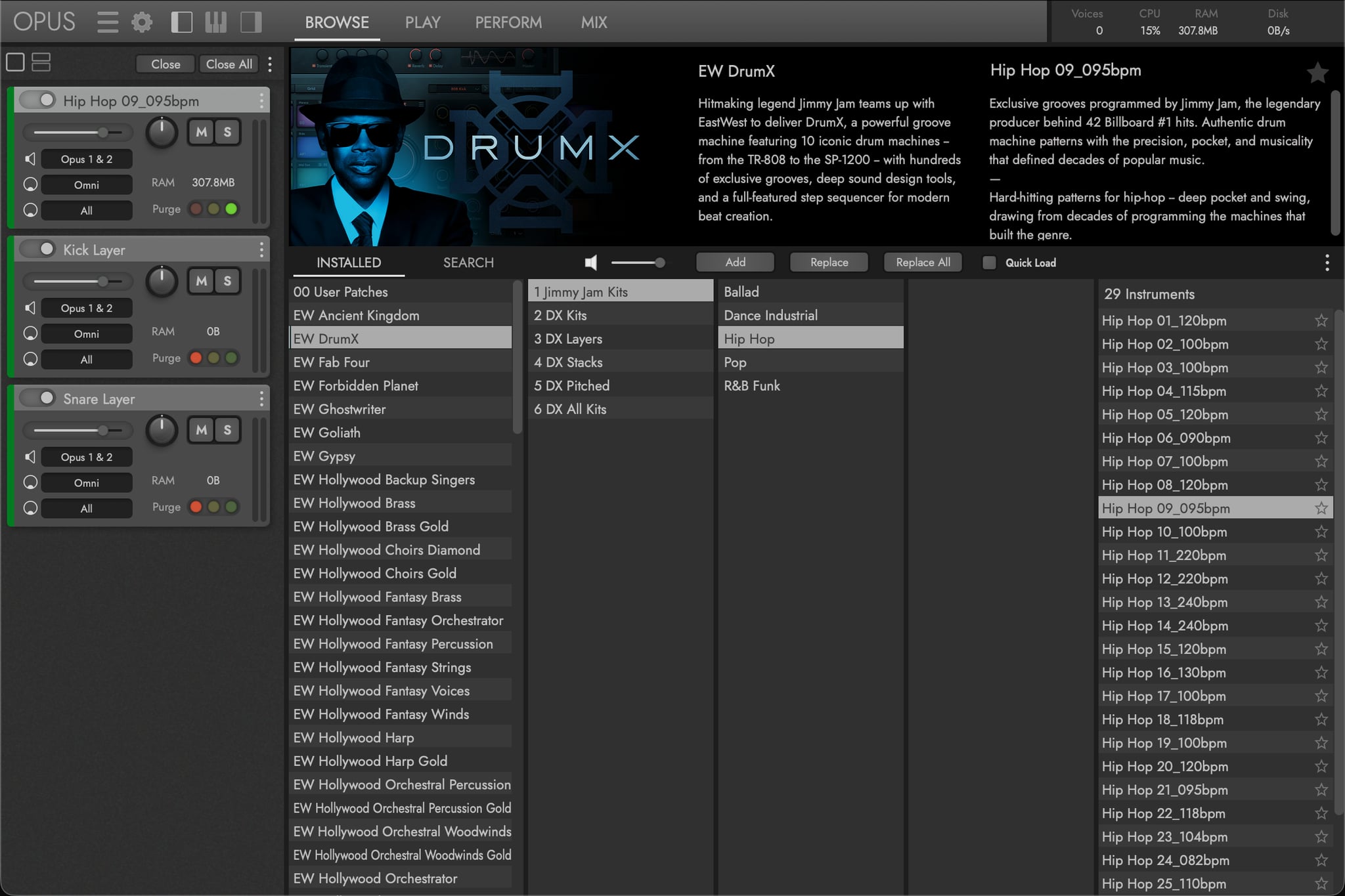
A Instrument Categories
DrumX organizes instruments into six browser folders, listed below in order of significance:
| Category | Purpose |
|---|---|
| Jimmy Jam Kits | Groove-loaded kits programmed by Jimmy Jam, organized by genre |
| DX Kits | Complete multi-pad kits, one per drum machine |
| DX Layers | One drum type on a single pad, switchable between all 10 machine variations |
| DX Stacks | Trigger multiple machines simultaneously on one pad |
| DX Pitched | Chromatic mapping for melodic / tuned play |
| DX All Kits | Construction kits with every sound from every machine |
B Category Details
A detailed accounting of what each category contains — instrument counts, contents, and what to expect when you open each folder.
Jimmy Jam Kits (213 instruments)
The headline category of the library. Groove-based kits programmed by Jimmy Jam, the legendary producer behind 42 Billboard No. 1 hits. Each Jimmy Jam Kit is a complete, playable drum instrument that comes pre-loaded with a specific groove preset at a designated tempo — shown in the instrument name (e.g., “Pop 04_125bpm”). Load a Jimmy Jam Kit and you’re immediately hearing a fully programmed rhythm with decades of hit-making feel, swing, and pocket. From there, customize the sounds, tweak the pattern, or swap the groove to fit your track.
Jimmy Jam Kits draw from both the core 10-machine sample library and a set of exclusive custom samples crafted specifically for these kits — sounds that aren’t available in any of the other categories. The 214 Jimmy Jam groove presets that ship with DrumX are bundled inside these kits; each kit automatically loads its own signature groove into the sequencer when the kit is selected.
Kits are organized into 5 genre subfolders:
- Ballad — 23 kits, 65-180 BPM, slower and expressive
- Dance Industrial — 68 kits, high-energy electronic and industrial
- Hip Hop — 29 kits, deep-pocket classic-to-modern hip-hop
- Pop — 58 kits, versatile hook-driven pop grooves
- R&B Funk — 35 kits, tight syncopated funk and R&B
Instrument names follow the convention <Genre> NN_<BPM>bpm (e.g., Pop 04_125bpm).
DX Kits (10 instruments)
The 10 classic drum machine emulations, each packaged as a complete kit mapped to the 16-pad grid. Loading one of these kits gives you every sound from that machine with all its original machine-specific parameters (Tone, Decay, Pitch, Snap, Attack) intact.
- TR-808 — 16 sounds, Tone/Decay/Snap/Pitch parameters
- TR-909 — 11 sounds, Tone/Decay/Attack/Pitch/Snap parameters
- TR-606 — 7 sounds
- LinnDrum — 23 sounds including 7 snare variants, Pitch parameters on snares/sidestick/toms/congas, Decay on closed hat
- LM-1 — 11 sounds, Pitch parameters across the board, Decay on closed hat
- DR-55 — 4 sounds, Tone parameter
- DR-110 — 7 sounds
- DMX — 16 sounds, Pitch/Attack parameters
- DrumTraks — 13 sounds, Pitch parameter with 16 steps
- SP-12 — 26 sounds, Pitch parameters across kicks/snares/toms/tonal cymbals, Decay on hi-hats/select cymbals
DX Layers (33 instruments)
Single-drum-type instruments that map all 10 machine variations of one drum type onto a single pad — the Pad Inspector’s Drum Selector picks which machine’s version plays. Load a Kick Layer, for example, to add a kick layer to an existing drum kit without loading a second full kit, then switch between machine versions (TR-808, LinnDrum, DMX, etc.) on the fly via the Drum Selector menu.
Standard Layers (17 instruments):
Kick, Snare, Sidestick, Clap, Closed Hat, Open Hat, Crash, Ride, Tambourine, Cowbell, Cabasa, Maraca, Clave, Toms and Congas All, Toms and Congas High, Toms and Congas Mid, Toms and Congas Low.
Custom Layers (16 instruments):
Extended layer instruments with additional sounds: Kick, Snare, Sidestick, Clap, Closed Hat, Open Hat, Crash, Ride, Tambourine, Cowbell, Cabasa, FX, Percussion, Snap, Toms and Congas High, Toms and Congas Low.
DX Stacks (16 instruments)
16 stack instruments that map the same drum type from multiple machines onto consecutive pads, designed to be triggered together. Hit one pad and multiple machines sound simultaneously for massive, layered hits.
- Kick Stack, Snare Stack, Sidestick Stack, Clap Stack, Closed Hat Stack, Open Hat Stack, Crash Stack, Ride Stack, Tambourine Stack, Cowbell Stack, Cabasa Stack, Maraca Stack, Clave Stack, Toms and Congas High Stack, Toms and Congas Mid Stack, Toms and Congas Low Stack.
DX Pitched (134 instruments)
Individual drum sounds from each machine tuned chromatically across the 16 pads (C1 through D#2). Useful for TR-808-style bass lines from kicks, melodic fills from toms, or pitched textural effects from cymbals and percussion. Organized by drum type, with a separate instrument per machine variant:
- Kick (11), Snare (19), Sidestick (8), Clap (10), Closed Hat (11), Open Hat (10), Crash (6), Ride (9), High Tom (13), Mid Tom (9), Low Tom (11), Tambourine (4), Cowbell (5), Cabasa (3), Clave (3), Maraca (2).
DX All Kits (2 instruments)
Composite “construction kits” that load every sound from all 10 machines into a single instrument. All Kits are best used as a starting point for custom kits: load one, browse the complete sound palette across all 16 pads, pick the drums you want to keep, and use the Finalize Kit button to remove everything else.
- All Kits — Every sound from all 10 machines across the factory Complete layout.
- All Kits_Custom — An empty-slot template with the same full sound palette available, ready for you to assign sounds from scratch to each of 16 custom pads.
PLEASE NOTE: This message appears automatically when an All Kit is loaded — This instrument is a construction kit. It contains ALL drums from all Kits, making it very slow to load. When you are done selecting drums please remember to use the ‘Finalize Kit’ button (All Kits only) to remove all unused drums and speed up loading! Load times also depend on your system specifications.
CONTINUE READING | SECTION 2.1.1 INSTRUMENT BROWSER for the Browse page toolbar and browsing modes.