2.3.6 Effects
Hollywood Scoring Tools includes a global reverb (with both Convolution and Algorithmic engines), a per-slot EQ – ENV tab with Attack/Release controls and a 3-band parametric EQ, and a per-slot Insert FX rack with 21 effect types across six categories.
A Global Reverb
The global reverb lives in a Global FX panel, found on the Shape tab by clicking the Global FX button and dismissed with its Close button. Opening it closes the Instrument Browser if that was open, since the two share the same space. A Type menu switches between two engines, each with its own set of controls and its own starting points: 21 convolution spaces and 9 algorithmic settings.
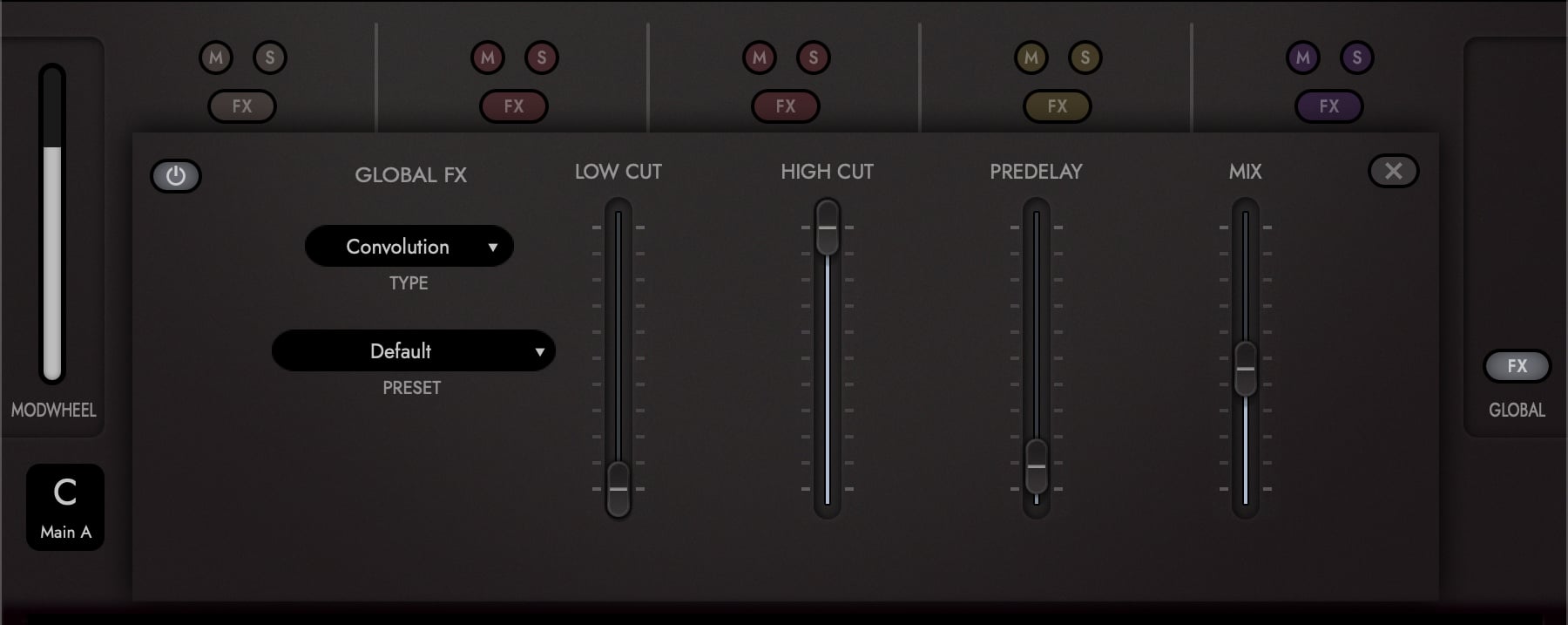
Convolution plays your signal through an impulse response, a recording of a real acoustic space. The space is chosen from the Preset menu rather than picked as a raw impulse file, so each entry arrives already balanced for scoring.
| Control | What it does |
|---|---|
| Low Cut | Rolls off the low end of the reverb tail so it does not cloud the bottom of an arrangement. Defaults to 30 Hz, effectively open. |
| High Cut | Rolls off the top of the tail, for a darker or more distant space. Defaults to 18 kHz, effectively open. |
| Pre-Delay | Delays the reverb after the dry signal, letting an attack through unprocessed. |
| Mix | Balance of dry and processed signal. |
Algorithmic builds the space rather than sampling one, and offers a size control in place of a recorded room.
| Control | What it does |
|---|---|
| Size | How large a space is being emulated. |
| Decay | How long the tail takes to fall away. |
| Pre-Delay | As above. |
| Mix | Balance of dry and processed signal. |
Each instrument slot has an independent Reverb Send that sets how much of it reaches the global reverb, so instruments can sit at different depths: less send for something in front, more for something behind.
Reverb Presets
Both engines ship with starting points, selectable from the reverb’s Preset menu.
Convolution: Balanced Orchestral Hall (Mono Send) · Balanced Orchestral Hall (Stereo Send) · Bright Epic Hall (Stereo Send) · Default · Digital Long · Digital Short · EMT 240 Long · EMT 240 Short · Epic Hall · Epic Hall (Mono Send) · Epic Hall (Stereo Send) · Epic Hall Short (Mono Send) · Epic Hall Short (Stereo Send) · Long Shimmer · Massive Cathedral · New Hollywood Hall 2.0s · New Hollywood Hall 2.6s · New Hollywood Hall 4s · San Francisco Hall (Mono Send) · San Francisco Hall (Stereo Send) · Short Shimmer.
Algorithmic: Balanced Algoverb · Bright and Long · Bright and Short · Dramatic Hall · Immersive Stage · Shimmering Dream · Synth Verb · Virtual Scoring Stage · Warm Hall.
Several convolution spaces come in two versions. (Mono Send) feeds the reverb from a mono send, (Stereo Send) keeps the send in stereo; the pair is otherwise the same space, voiced for each.
B Per-Slot EQ and Envelope
Click the FX button on a slot’s mixer channel strip on the Shape tab to open its FX page. The first tab, EQ – ENV, contains:
- Attack and Release: two sliders shaping the slot’s envelope. Like the volume fader, each has a min and a max handle, so the mod wheel can sweep the value between them.
- 3-band parametric EQ: a fully featured EQ with an active toggle. The EQ sits before the slot’s Insert FX rack, ahead of the reverb send, so it shapes the tone that feeds both the inserts and the reverb.
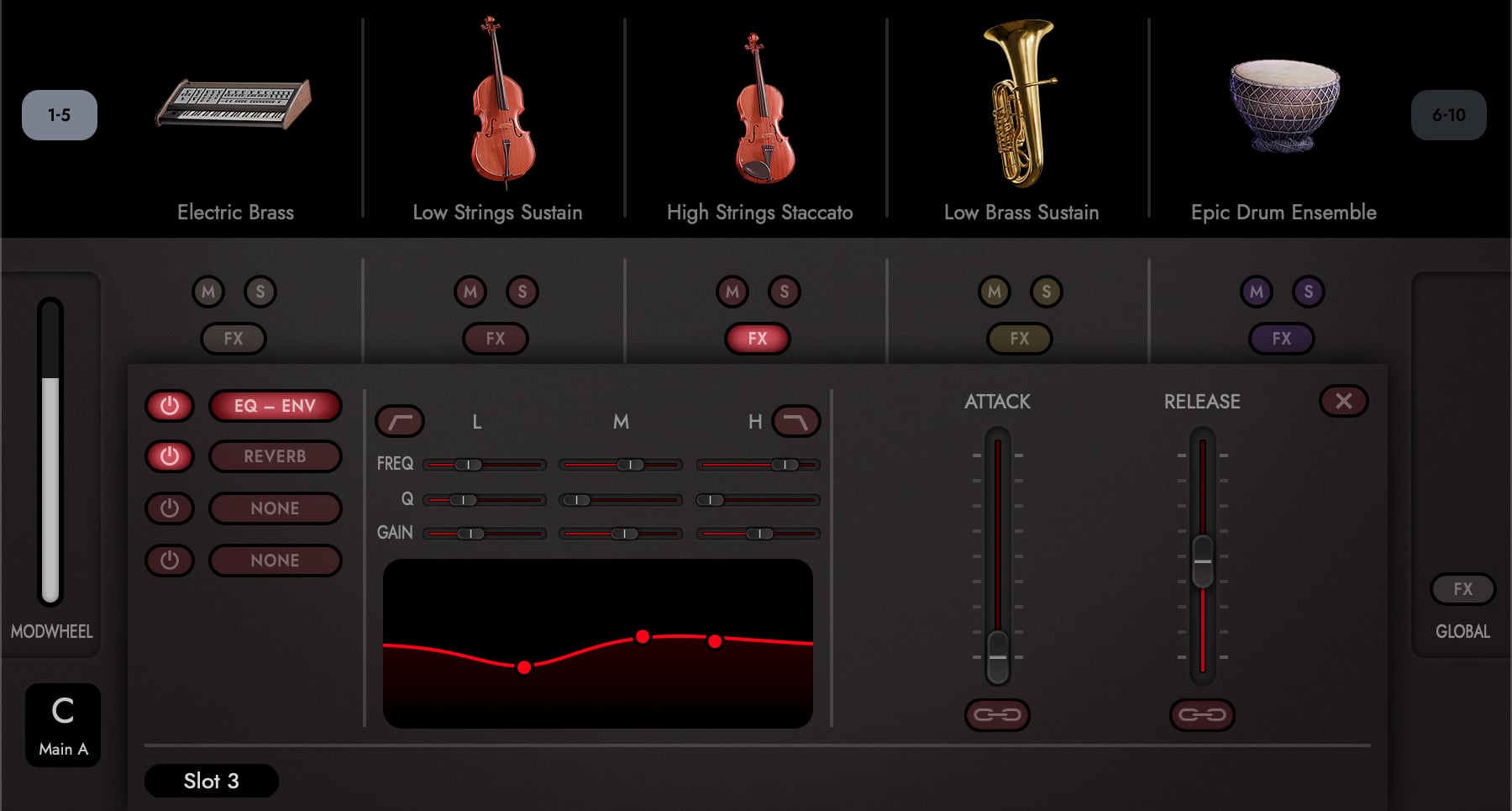
Each EQ band provides:
| Parameter | Range | Default |
|---|---|---|
| Frequency | 20 Hz to 20 kHz | Band 1: 90 Hz; Band 2: 800 Hz; Band 3: 1500 Hz |
| Gain | -18 dB to +18 dB | 0 dB |
| Q | 0.0 to 1.0 | 0.5 |
The three bands are labelled L, M and H across the display.
Low Cut and High Cut
The outer two bands can each drop their bell shape and become a filter, using the Low Cut and High Cut buttons beside them:
- Low Cut turns the L band into a high-pass filter, rolling the bottom off the slot so it stops competing with the bass of the arrangement.
- High Cut turns the H band into a low-pass filter, taking the top off a slot that is sitting too far forward.
Each button only changes what its band does. The band’s frequency control still sets where the filter turns over, so you can sweep it exactly as you would a bell.
Both buttons take the colour of the slot’s instrument family, as the rest of the slot’s controls do, so it stays clear which slot you are editing when the panel is open.
The EQ draws its frequency response live as you adjust the bands, and you can drag a band’s handle directly on the curve: left and right for frequency, up and down for gain.
C Per-Slot Insert FX Rack
Each slot also exposes three Insert FX buttons, listed below EQ – ENV on the FX page. Each is labelled with the category of the effect it holds, or NONE when it is empty. Every insert can host one of 21 effects, picked from the six Effect Category buttons along the bottom of the page:
| Category | Subtypes |
|---|---|
| Filter (4) | Low Pass, High Pass, Band Pass, Notch |
| Dynamics (4) | Tape Sat Compressor, SSL Bus Compressor, SSL Transient Shaper, Limiter |
| Distortion (5) | Booster, Black Distortion, Bitcrusher, Fuzz, Legend Amp |
| Delay (2) | Delay, EP1 Delay |
| Modulation (4) | Chorus, Flanger, Phaser, Tremolo |
| Reverb (2) | Convolution, Algorithmic |
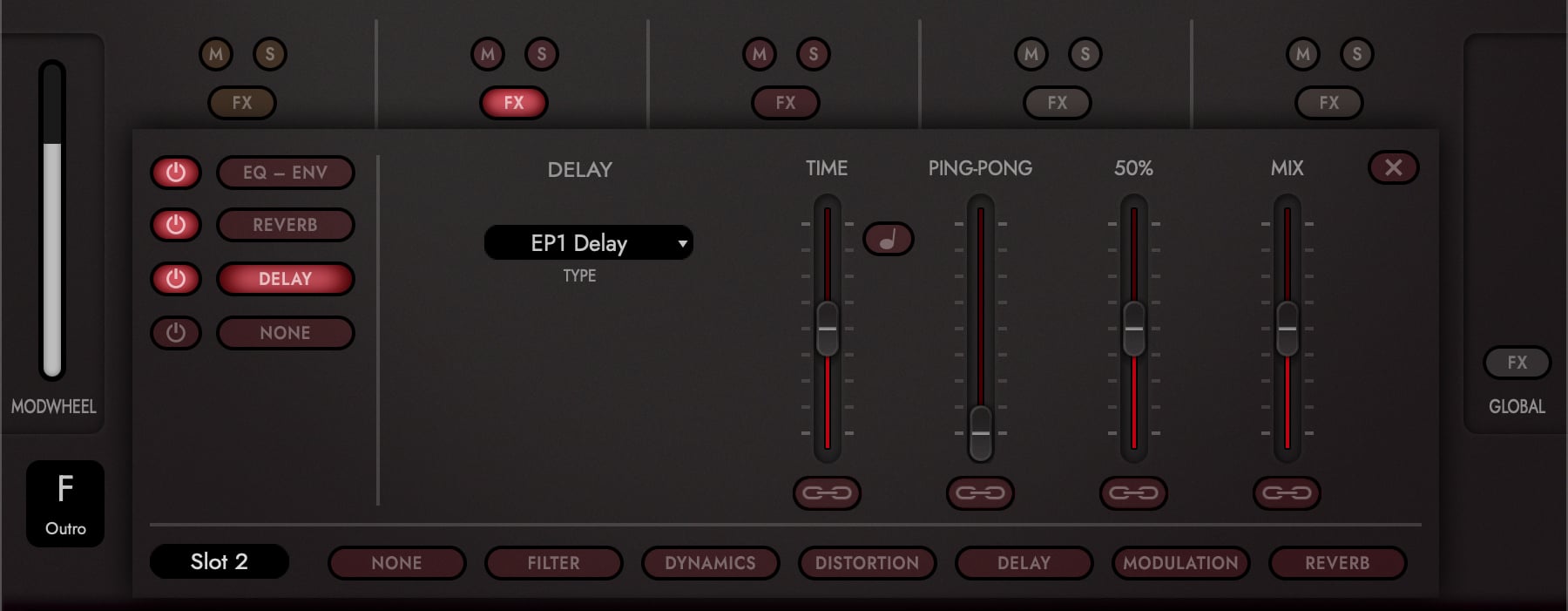
Choosing a category fills the Effect Type menu with that category’s effects, and picking one loads it into the insert. Each insert also carries a Power Switch of its own, so individual effects can be auditioned in or out of the chain without losing their settings.
Every insert parameter is a slider with min and max handles and a link toggle, like the volume fader, so any effect setting can ride the mod wheel. Time-based ones (a delay’s time, a tremolo’s rate) add a sync toggle that locks them to the host tempo.
Loading an effect into an empty slot switches it on for you. Loading one over an effect that is already there leaves the slot’s enabled state as you set it, so a bypassed slot stays bypassed while you try alternatives through it.
OPUS SOFTWARE MANUAL | SECTION 2.4.3 EFFECTS LIST documents all of these effects in full, the Reverb and Algoverb processors behind the global reverb included, along with the controls Hollywood Scoring Tools does not expose.